
In the two previous posts on Google Docs that can be found on this blog, I have focused on how it can improve collaboration between colleagues as well as between teachers and students. In brief, Google Docs allows you to instantly share documents with whomever you wish. As it automatically generates and sends the link to the people you choose, it removes the downloading and attaching documents to an e-mail paradigm. We typically take this for granted because we are used to it. For the past several years, e-mailing documents back and forth to a colleague or student was the most efficient method, but it no longer is. Moreover, with Google Docs, two or more people can work on a document at the same time from anywhere. This makes it incredibly useful for doing group projects in and out of the classroom. Students no longer have to wait for their peers to finish and e-mail their part of the assignment. They can see what their group mates are doing, or more likely not doing, in real time.

Furthermore, I made a short survey about Google Docs that our students have recently filled out. It could be stated that perhaps our students are afraid to tell us if they don't like working with it because it will hurt our feelings, but I truly believe that they are honest on these surveys. Nonetheless, here are some of the results of the survey on Google Docs, and you will find that they are extremely positive. What we found really beneficial from the survey is that the students found it easy-to-use, and most of them either gave or received help from their peers on the couple of assignments that we have done thus far this year.


 With of all that in mind, imagine if could create a PowerPoint presentation in the cloud that could be instantly shared and edited in real time by your colleagues or students just like the docs mentioned above? Does it sound too good to be true? It isn't. With Google Docs, you can! With a free Google account, simply log into Google Drive. Once there, you will see a large Create button on the left-hand side of the page. Click that, choose presentation, and Bob's your uncle, you now have a presentation in the cloud that can be shared instantly without the need to e-mail. This makes it a wonderful tool for creating group presentations!
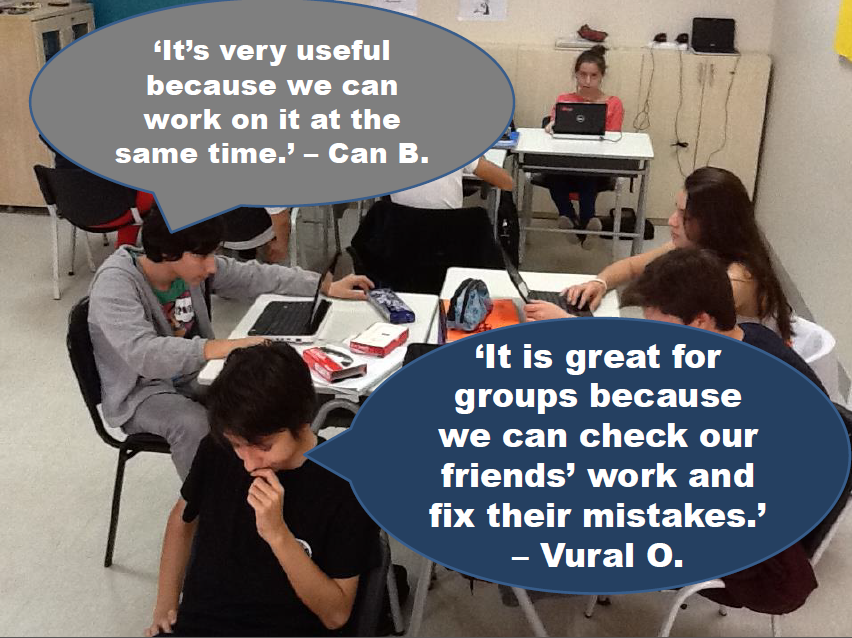
We have used Google Docs on several projects now this year, and the students have really taken to it. One of our students, Vural, said that he enjoys working with Google Docs because he can see and fix his group mates' mistakes from his own computer. Another student, Can, remarked that it is useful because the students can work on a document at the same time.
Furthermore, I made a short survey about Google Docs that our students have recently filled out. It could be stated that perhaps our students are afraid to tell us if they don't like working with it because it will hurt our feelings, but I truly believe that they are honest on these surveys. Nonetheless, here are some of the results of the survey on Google Docs, and you will find that they are extremely positive. What we found really beneficial from the survey is that the students found it easy-to-use, and most of them either gave or received help from their peers on the couple of assignments that we have done thus far this year.


Our Example
Most recently, we have used Google presentations as an activity to complete a grammar unit. We had been teaching comparative and superlatives for several lessons. We completed exercises on the IWB and their grammar books, but then we wanted the students to produce something on their own. Production is the key. That is when you can observe if your students have truly understood any give grammar point. If they are able to produce something meaningful on their own and in the correct context, you can be confident that they have got it.
 We decided on creating one Google presentation for the whole class, where each student was responsible for creating two slides with a picture and a sentence or two using a comparative or superlatives about the item or person in the picture. We left it totally up to them. They could write something about their favorite celebrity, sports star, technological gadget, just to name a few.
 Here are a couple of slides that our students produced. You will see that the first picture shown here has also included a widely-used idiom, barking up the wrong tree. Believe it or not, we spend 20-30 minutes each week teaching our students four new idioms. Many educators in ELT can't believe that we do this and, even more so, that our students actually know what they mean and use them from time to time. We have been teaching the most popular idioms in English for two years now, and we have had much success with them.
 To do this activity, all I had to do was to create a new presentation on Google Docs. I made the title slide with a recent picture of the students, and then followed that by making two blank slides for each student. Just to avoid confusion, I typed their names at the top of each slide. Finally, I shared the presentation with all of our students by simply clicking the share button and adding their e-mail address in the box provided. After that, every student was able to work on the same presentation at the same time.

 Here are a couple of slides that our students produced. You will see that the first picture shown here has also included a widely-used idiom, barking up the wrong tree. Believe it or not, we spend 20-30 minutes each week teaching our students four new idioms. Many educators in ELT can't believe that we do this and, even more so, that our students actually know what they mean and use them from time to time. We have been teaching the most popular idioms in English for two years now, and we have had much success with them.
The Eureka Moment
One of the biggest advantages of using Google Docs is the fantastic opportunity and ease of peer review. Every student has the ability to look at what his or her classmates are doing from their own computer. We had planned to tell the students to peer review once everyone had finished, but before I even had the chance to tell them, one of our students, Melisa, told her classmate, Berk, that he had made a mistake on his slide! It was an unbelievable moment as a teacher because that means that she began to look at the others' slides without me even prompting her. It was a tiny moment in the larger scheme of things, but it proved to me that Google Docs can be an excellent tool to use for group work in the ELT classroom.


