Our Educational Message

Hi, and welcome to our blog. This space is designed to share ideas and methodologies that we use to teach Turkish teenagers. In particular, there is a strong focus on ICT-ELT, which means if you like visual and technological support for your style of teaching, this blog is for you. My colleague, Brentson Ramsey, has been working alongside me for three years. He is also a big proponent of the ICT-ELT Paradigm, which means he will also be posting from his own teaching perspective on the blog.

2010 was the beginning of this new journey, and although there is no definitive ICT-ELT road map available for everyone to follow, it is exciting to explore the technological means to make teaching more fun and affective for students. Our main message is for teachers to ADOPT & ADAPT the paradigm shift for their own needs, and remember that
ICT-ELT is a TOOL, NOT a SOLUTION.

Saturday, 20 April 2013

The Avengers Retold: A Comprehensive ELT Activity


The final two months, in all seriousness, is my favorite time of the academic year. The reason for that is, by April, we have brought the majority of our students up to a strong B1 English-proficiency level according to the CEFr, while a few have even reached B2.  Furthermore, my colleague and I have taught a variety of literary analysis and academic writing skills throughout the year, and now they are finally starting to sink in with the students. What this allows us to do is spend more time on innovative and collaborative projects that include a variety of academic skills to wrap up the year, one of which is called The Avengers Retold.  Just to give you a sense of what this project is about, please watch the following trailer that we have made on Apple IMovie.     


The Avengers Retold


From the trailer, this activity may appear to be as simple as getting students to fill in speech bubbles from any given comic book. That is indeed included, but that is just the tip of the iceberg. The Avengers Retold also incorporates a number of the grammar, literary and ICT skills that we have taught our students throughout the year. These included reported speech, the SCASI and SPRE literary organizational models, as well as IWB and PowerPoint technical skills. It was basically a year's worth of ICT in ELT teaching broken down over about six class hours between two groups.


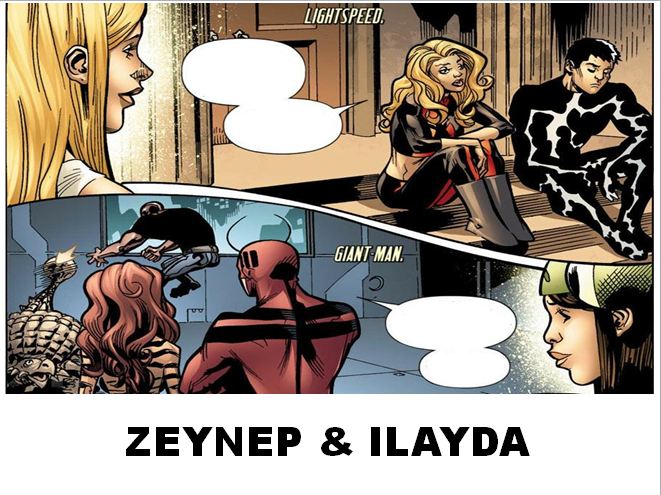
The project all begins with each student getting one picture from The Avengers comic book with the aim of creating a dialogue to fill in the empty speech bubbles.  However, the key to this activity is collaboration.  Well before the writing of the dialogue can begin, the students are told that they have to put all of their pictures together to make one story.  In order to do this, they first have to work together to place the pictures in any order they wish. They, then, must develop the characters, story and dialogue using the SPRE and SCASI models to give the story a sense of purpose and a fitting conclusion. Finally, when the speech bubbles are completely filled in and saved to a PowerPoint presentation, it is sent to the students of the other preparatory class to assess and retell the entire story in reported speech; which is then recorded and turned into a PowerPoint video, as seen here.


Again, the entire process takes about six or seven class hours, not to mention a couple of hours of teacher preparation. Therefore, we have broken down the activity into three parts to give you a step-by-step detailing of how you can also prepare and implement this activity in your own class.  (You can also download a copy of a checklist for the activity here.) It is worth the time and effort. 


Step 1: Prior to Class

1. To begin with, you need to select pictures from any comic book for the number of students that you have.  Each student will get one picture for which to create a dialogue.  Secondly, you want to have an appropriate amount of speech bubbles for each picture, preferably four.


2. The next step is to erase the original text in the speech bubbles.  The easiest method for us is to upload the picture to the IWB and erase the text by rubbing it out.  If you do not have an IWB, it could be done on your computer through various picture editing programs.

3. After saving each picture, we then added them all to a PowerPoint presentation, and we assigned a picture to a pair of students who are not in the same class. The reason for this is that, for example, Barışcan will create the dialogue for the picture, and when all is said and done, his partner, Petek, from the other class, and who has not seen what Barışcan has written, will report what is in the speech bubbles to the rest of her own classmates. 

4. Finally, we printed out a set of pictures to help the students put the story together, which will be explained in Step 2. We also uploaded the PowerPoint presentation to our PLN (Edmodo), so that the students could have a digital copy of their assigned pictures as well.

(If you would like to use the same Avengers pictures as we have, you can get them here) 


Step 2: Putting the Story Together

Putting the story together from beginning to end is the largest and most time-consuming part of this class activity. 

1. Present the PowerPoint presentation to the class, and tell each student to identify and begin thinking about their own slide.

2. Go through the presentation a second time, and as a whole class, discuss the context of the pictures. What's happening in them?  

3. Then discuss the (S)etting, (C)haracters, (A)ction, (S)tyle and (I)dea (SCASI) of the story, and make a table on the IWB. Students copy the table in their notebooks.
 
4. Next, again as a whole class, discuss the (S)ituation, (P)roblem, (R)esponse and (E)valuation (SPRE).  This organization model will give the story a rise and flow, followed by a conclusion. As in the previous step, make a table on the IWB, and students write it down in their notebooks.

5. Attach the printed copies of the pictures to the whiteboard, and the plan the order of the story based on  SPRE.  You can assign one student to come to the board and help with the organization of the pictures.  Once you have the order set, you then change the order of the pictures on the PowerPoint presentation to correspond with what the students have thought about and decided. 

6. The students then get into small groups based on where their assigned picture lies in the SPRE. For example, the students with the pictures designated in the (S)ituaton come together, the students in the (P)roblem area work together, and so on.  They write out their speech bubbles in their notebooks, making sure that what they are writing makes sense as a story. 

7.There should also be one representative from each group to go and see what the group before them in the order of SPRE  is writing, again to make sure that the story is coherent and cohesive.

8.  When all the groups have completed their speech bubbles, they come back together as a whole class, but this time working in a discussion circle.  The students read and act out the comic they have written from beginning to end.  The teacher assists in fixing any errors in the content and language.


9. Once ready, the students then come to the IWB, in turn, and write out their speech bubbles.  Each picture is then snipped again using the Windows Snipping Tool and made into a PowerPoint presentation.

10.  The presentation can then be uploaded to your PLN for the students in the other class to download on to their own computers.

 Step 3: The Retelling in Reported Speech 

The final part of this activity is where you switch over to another classroom and the practice of reported speech comes into play.

1. Get the new group of students to download the prepared PowerPoint presentation from step 2. Have the students read the story by themselves quietly and also identify with their assigned slide.

2. The teacher also displays the presentation on the IWB.  As a whole class, read through the story and get the students to identify the SPRE  in the story. You can also discuss how the story may be different from their own class and whether they liked it or not.

3. Students then return to their netbooks where they downloaded the PowerPoint presentation and write out the speech bubbles of their assigned slide in reported speech in their notebooks.

4. Once all students are finished, call them one by one to the front of the class and get them to retell the story in reported speech.

5. As an ICT bonus, you could also record the students' voices while they are reading their own sentences. It is so easily done now with smartphones and tablets. Tell the students to go off on their own to a quiet place and record their sentences.  Once finished, have them email their recordings to you, and then add those recordings to the PowerPoint presentation, and save it as a Windows Media video. Upload the video to Youtube/ Vimeo, or your blog and proudly share their work with the world!
 

  A Final Word

Despite this being quite an undertaking in terms of time and organization, we definitely recommend doing this type of activity in any ESL class.  It is without doubt one of the most successful and rewarding projects for everyone, that we have designed, prepared and completed.  It combines so many facets of ELT all in one project, from grammar and speaking to literary analysis and story-boarding organization. To give you an idea of just how many skills have been incorporated into this project, we have listed them below...

GRAMMAR: Using direct and reported speech to retell the story


READING: Reading and understanding the other class' story


WRITING: Writing out sentences in their notebooks, and on the IWB


SPEAKING: Talking and discussing with classmates to create the story


LISTENING: Listening to each others' ideas during the creative process


CREATIVITY: Tapping into the students' creative process in order to create their very own story


COLLABORATION: Working together in small groups, and as a whole class to create the story, and then to make sure it is coherent & cohesive 


LITERARY ANALYSIS: Using SCASI and SPRE to not only analyze their own story, but also to assess the other class' story 


ICT:  Using ICT tools such as Edmodo, the IWB, Snipping Tool, PowerPoint and smartphones or tablets to make and record the final class video

Friday, 19 April 2013

USING PROPAGANDA to PERSUADE YOUR AUDIENCE

Today we want to share our latest INNOVATION ZONE project that is taking place this morning over in our Preparatory classes.  Since we have been studying PERSUASIVE TECHNIQUES in ADVERTISING and ACADEMIC WRITING we felt it a great opportunity to have the students use these (hopefully) learned techniques to promote and persuade their audience (US, or any of you who would like to see them?) in next week’s presentation time during the INNOVATION ZONE. I will explain it below…

The use of propaganda in our lives is perpetrated by governments, associations and other groups who want to sway and persuade audiences to follow their ideas and beliefs.  The THREE techniques we shared with our young teens in Hazirlik were:

ASSOCIATION – Celebrities, Jumping on the bandwagon of groups, fashions…

LOADED LANGUAGE – Positive or Negative

EMOTIONAL – Vanity, Fear, Humor etc

So, I made two adverts that are self-explanatory once you click the links. 


You can see that I have used the same pictures for both Edu-Commercials.  That is another scaffolding attempt to get students to see that if emotive language, association and loaded language are used they can be persuaded to follow the commercial/advert maker’s idea.  I intentionally exaggerated the negatives and positives to show how far people go to persuade their audience.  I decided, however, not to use overly-graphic images since that can turn people off who are sitting on the fence.

So, how are we expecting to transfer this to the students’ collaboratively creative minds?  We will be putting them in groups, chosen by our desktop app, Triptico (that way everyone participates, as it is done randomly) then we will ask the students to discuss in groups of FOUR to decide upon which social issue they feel strongly about.  For this to work, and assure that everyone has a voice and the chance
to persuade using the techniques stated above, each student is being given 3 minutes to convince their peers which social issue they want to promote.  Once the 3 minutes are over, a vote will be taken, and that is what that group will research and complete for presentation next week.  We will now have FIVE different propaganda campaigns next week.  We will share with our school's colleagues and have them see our students participating in this creative & collaborative process.

Sunday, 14 April 2013

Record and Report: An ICT-Supported Activity for Reported Speech

One of my own favorite grammar units that my colleague and I teach during the year is reported speech.  First and foremost, on an academic level, reported speech is a difficult, yet immensely useful grammar structure for any ESL student to learn.  It takes several hardcore classic-style taught lessons before most students even begin to get the hang of it.  However, after that, it is when the real fun of grammar teaching begins.  Reported speech, simply by being collaborative, in nature, allows for so many different kinds of group activities to get the students to practice it in a more 'authentic' situation.  In fact, we recently posted an activity for teaching the reported speech on our blog called The Ticker Tape, which we encourage you to read by clicking here.  This post, however, is about another activity we completed in class called Record and Report, where students recorded voice messages for one another, and then reported them back to the class as a whole.

The Process

Step 1: Before Class Begins

Record and Report is an ICT-supported activity, and all you need to have is any voice-recording application or program on your device.  

The first point to consider is which ICT tool(s) you are going to use. If your students have laptops or netbooks, there is certainly a 'Sound Recorder' program already on them. If you wish to use tablets or smartphones, there is without doubt many voice-recording apps to choose from.  One that I highly recommend, called Voice Record Pro, is a free application available for the IPad and IPhone.  It records voices with exceptional crispness, and is extremely user-friendly.  After recording, a menu pops up that allows the user to send the message via email or bluetooth, share to Facebook, or save it in the cloud via Dropbox, Google Drive, or SkyDrive.    


Next, you need to decide on the content that your students will talk about and record.  This is the fantastic part about this activity.  The content is totally up to you.  You simply need your students to talk about a given subject for a short time, say between 10 and 20 seconds.  We chose for our students to talk about a major part of our curriculum called the Innovation Zone. (You can read more about it by clicking here)  We focused on the questions pictured just below.


Then, as the final part of the preparation for the activity, you need to set up the pairs that will be working together. Since we have two classes, as shown below, we paired the students up with one from each classroom.  Furthermore, you should make sure that you have all of their email addresses handy, as your students will need them to send their voice recordings to their partners.

  
Step 2: In the Classroom

Once class begins, and you have introduced the activity to your students, the first thing to do is to get your students to write our their ideas to the question prompts that you have given them in their notebooks.  I highly recommend this step because, in my experience, students quickly lose focus of the purpose of the activity because either they get too excited about using technology, or they are already feeling self-conscious about recording their voices.  If you get them to write it down first, they think more about it, so when it comes time to record, they can simply read out what they wrote, which helps take away some of their nerves.


When you feel that the students have written out meaningful responses, you can then allow them to find a quiet place to make their recordings.  At this point, some of your students may need help finding and setting up their voice recording applications or programs, so be prepared for that.  Once recorded, the students then send their recordings to their partners, who have also done the same.


The students then return to their seats and wait for their partners to send their recordings.  When they receive them, as pictured above, students should listen to the recordings carefully and write down what their partner has said into their device.  After that, they should transpose what was said into reported speech. 
Finally, once everyone has finished, get your students to report to you and the rest of the class what their partner said.


All in all, most of the students really enjoyed doing the activity.  It was collaborative and the students who had IPhones or IPads were excited about downloading and using a new application just for this activity.  However, I purposefully wrote that "most students" enjoyed it because there were a few who were very self-conscious and nervous about recording their own voice.  Nonetheless, in the end, the activity helped show our students the importance of learning reported speech well.  Many of them made several grammar mistakes when reporting to the class, but that is the whole point of the activity.  They will make mistakes now, but they will definitely earn from the experience.

Friday, 12 April 2013

FLIPBOARD: Make Your Own Class Online Magazine in 5 minutes

Being a teacher on holiday from school means that after the first few days of recharging the batteries, time seems to be in plentiful supply, so what does a teacher do?  Well this one makes ample use of his Apple products, and in particular the ipad.  In doing so, I love to check out FLIPBOARD, an astoundingly informative and enjoyable magazine cataloguer.  It was released at the back end of 2011, and it now boasts the latest 2.0 version, which has an excellent new feature that teachers and students can make wonderful use of with only a few clicks.


The first step is to download the free app from the App Store. Once you have it on your iPad or Iphone (of course, if you don't have the Apple-bug, Flipboard is also available for all platforms) you can start setting it up for your website preferences.


This is an image of my Flipboard front page, from this morning.  In the app, the front page is fluid, which means it shows you example articles & images to entice you inside. This is a really quirky effect.


The available websites range from almost any at all that have images and articles as their emphasis.  You can see part of the list in the next image below.

So, my favorite websites that I use Flipboard for are Twitter, Instagram, 500px, BBC World and a few other news channels.  This is the old Flipboard described, but it is 2.0 that I want to share mostly with you.  The team has come up with a function that allows you to make magazines of what you believe are worth sharing under a magazine title you feel happy with and send the links as pages in your magazine.

All you have to do is CLICK ON THE + (PLUS) icon located at the top right of each news story.  The images below are 6 Blogposts from this site to show as an example.  I 'flipboarded' these from Twitter after I had shared them for the benefit of the magazine I shared with my Twitter-Teacher friends' base.  I now have this magazine to share with anyone as we update the blog every week.


Now, having promoted my first magazine above, I reckon we can all make this a truly viable tool for our students and classes of ICT-Supported programs.  This could be used by students uploading pictures relevant to any research activity or assignment the have done; or any tweet that the students have written in 140 characters responses to lessons and or assignments.  What we plan to use it for next week is to have our students do some research on the Holocaust and effects around the world during WW2.  The students are starting The Boy in the Striped Pyjamas, so this new digital magazine option in Flipboard will give an engaging and exciting new tool to support their studies.


Tuesday, 9 April 2013

Why We Need to Focus on Curriculum

Two weeks ago I presented at the 'happening' Beykent University conference.  My dear friend, Fatih Yucel, the Assistant Director of the ESL Program over there had asked me to Keynote my ideas and working practices of what Curriculum means to me, and what I am doing in consideration of ICT and CEFr in the context of our Preparatory (Hazirlik) program at my school.  Fatih had organized for each speaker to give a short TV-interview about our feelings on Curriculum and why it is essential that curriculum designers, and in particular teachers, look to their educational frameworks for guidance in putting over better content and working practices to their students.  My fellow Keynote, Tony Gurr, also adds to the video-fest we found ourselves involved in prior to the opening speeches.


Although the content of my presentation focused primarily on Curriculum, I tried to make it more user-friendly for the audience.  Curriculum-Focus has traditionally been considered as 'dry' by even the most enthusiastic of teachers.  So, I attempted to present my practices via technology-support and video content.  That way, teachers could get to see that it doesn't need to be dull, frustrating and off-putting if it is approached in the right way.  My feeling is that if schools  put Curriculum and ICT at the forefront of their planning focus, teachers can develop more skills that can engage and interest their students.

The main ICT-Tool I use at my school for Curriculum planning is COMMON CURRICULUM.  This new and very exciting organizer allows for serious collaboration between designers, teachers and students.  Here is a short video explaining how it works.


Once teachers Adopt this software, they can see how collaborative using the Curriculum Content as the main focus for their collaborative group work with colleagues.  Gone are the days of waiting for other busy teachers to come together and discuss what is in the program.  By using the same sign-in and password, teachers can work from home planning and organizing their week.  Then once the autonomous brainstorming and ownership-led input has been collated on the software cloud, face-to-face interaction can take place with many more feelings of achievement felt by all of the group.

Tony Gurr, an Ankara-based teacher, is also an avid proponent of ICT and curriculum focus. His video interview, below, alludes to the fact we all need to be considering inclusion of the Learners and not just Teachers, for the building of successful curricula.  His presentation was by all accounts informative and interesting, but what strikes me, since none of the Keynotes could see each other presenting as we 'informed-our-audiences" at the same time, is how each of us were talking the same language, and that was without any collaboration beforehand.  This is what makes me very excited about this new focus by presenters.  We have all realized, and others are too, that there needs to be something done to reform how we teach, and more importantly, how our students learn.  They need ownership as a stake-holder, just as we do if success is to be found and achieved.  It is no longer about Us & Them.  


What Tony alludes is where I believe the CEFr plays a vital role in getting the feelings, opinions and ideas from our students bang-slap-into-the-middle-of our content-considered teaching plans.  The second video clip from me is a short-part of my presentation where I allude to the importance of CAN DO Statements and Interviews.  Taking my Adapted "CAN DO" statements for the specific needs of my students, I hold student-interviews at the end of each month and discuss with them where they believe they are on the CEFr scale of progress.  The data is then recorded and shared with the students, so that they can see what they believe they actually can do.  Here is the video of that part in my presentation.


If we give our students the opportunity to self-assess they are more likely to take the whole learning experience to another level.  I have snipped four students' latest CAN DO STATEMENT & INTERVIEWS graphs to let you see what I mean.

                    STUDENT A

This female student from Ankara started the year at 2.25 on the CEFr scale measured from 0-5.  She has had an up and down type of year, which could be related to her sports scholarship, her age or indeed the difficulties she has faced living in a different city to her family.  However, what we believe is important to show is that she is able to see her progress, peaks and troughs via this transparent system differentiated to her own learning.


                      STUDENT B

This female student is also a sports scholarship student and from another city, Izmit.  She came in at 3.0 on the scale and found the initial stages of her year very difficult to adapt to.  Hence her performance dropped off quite considerably.  She says herself that the inclusion of formative assessment exposed her weaknesses as a as an English learner, which she is now thankful for.  Up until our ICT-supported program, her English lessons revolved solely around grammar and gap-fills.  Now, as you can see, she is starting to take-off, and we believe she is a prime example of how effective this system is.


                     STUDENT C

This male student is a born and bred Istanbul kid.  He arrived from another private school, so he is well-adjusted to Istanbul life and the education system therein.  He arrived at 3.58 on the scale, which is quite high for a Hazirlik student.  However, his problems have not been so much English, but more Academic study-skills.  His steady growth, yet not too impressive in real terms over 6 months on the scale, is probably down to his over-confident nature and approach to lessons.  That being said, his  skills- development has risen sharply, and he has also said how much he has appreciated the transparency


                        STUDENT D
The final student I would like to share with you is also a male student, and a sports enthusiast.  He came from a highly respected private middle-school in the city.  The fact he has not performed this year possibly alludes to his general feeling towards education as a whole.  We do not take it as a reflection of our program, but more of an indicator as to how important differentiated learning and individualized instruction is at the back-bone of any program.  We welcome the transparency, as it shows what we need to keep trying for future students of his type coming to our school.  We have tried to work with him throughout the year, but it has fallen on deaf-ears for the most part.  We can only hope that he can see sense of his own performance and lack of progress with this very clear and transparent indicator.


I strongly believe that transparency of our curricula and development of better collaborative practices with supportive ICT-Tools can lead to better teaching and Learning across Turkey.  If teachers and institutions make the transparency leap for their own frameworks and practices we could all really be on to something as 21st Century Educators and Learners.

          Beykent University Power Point Presentation